HTML5 in Gadgets on iGoogle

Wednesday, May 26, 2010 at 2:26 PM

Did you know gadgets can use html5? The key is in the doctype. Normally the doctype of a gadget isn't mentioned. Specify the html5 doctype in the gadget and it will be used when the gadget is rendered. Let's look at a quick example using the popular canvas drawing API:

<?xml version="1.0" encoding="UTF-8" ?>
<Module>
 <ModulePrefs title="html5 canvas">
 </ModulePrefs>
 <Content type="html" view="home,canvas">
  <![CDATA[
   <!DOCTYPE html>
   <script>
    var demo = {
     init: function() {
      var drawcan = document.getElementById('drawarea');
      if (drawcan.getContext){
       var context = drawcan.getContext('2d');
       var xmax = drawcan.width;
       var ymax = drawcan.height;
       context.strokeRect(0,0,xmax,ymax);
       for (var dotix = 0; dotix < 100; ++dotix) {
        var x = Math.random() * xmax;var y = Math.random() * ymax;
        context.strokeStyle = "#888888";
        var blueness = Math.floor(Math.random() * 256);
        context.fillStyle = "rgb(10,90,"+ blueness +")";
        context.beginPath();
        context.arc(x,y,5,0,Math.PI*2,true);
        context.closePath();
        context.stroke();
        context.fill();
       }
      }
     }
    };
  
    gadgets.util.registerOnLoadHandler(demo.init);
 
   </script>
   <canvas id="drawarea" width="150" height="150"></canvas>
  ]]>
 </Content>
</Module>


The top of the gadget still has the usual XML prolog because the gadget spec is, as always, an XML document. The html, in this case html5, is inside a CDATA block. The CDATA block means the structure of the html5 content is pretty much ignored when parsing the XML. iGoogle doesn't do anything extra for compatibility with html5; features specific to html5 will still only work in browsers that support them. Gadgets have the same cross-browser compatibility concerns as any other web page. Have a look at the When can I use guide for an idea of compatibility of features across browsers.

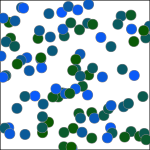
The content of this gadget is pretty straightforward. It includes a canvas element. In the init method it tries to get a drawing context. If it's successful (meaning the browsers supports html5 canvas) it will draw a rectangle around the extents of the element then draw 10 randomly placed dots inside. Use this gadget as a starting point to get your own html5 gadget running.

And yes, this gadget has a canvas in your canvas so you can render when you render.

OSAPI on iGoogle

Thursday, May 13, 2010 at 6:40 PM

The OpenSocial 0.9 specification introduced a simpler API called OS Lite (also known as OSAPI) which uses a syntax that's friendlier for Javascript developers.

Some steely eyed developers have already noticed that iGoogle works with most OpenSocial 0.9 features. The implementation of OSAPI should work as documented at opensocial.org.

Here's a basic example to play with so you can get started with the OS Lite API. In this example we will execute a request to fetch and display a list of the user's friends.


<Module>
 <ModulePrefs height="800" title="osapi friends" title_url="http://code.google.com">
  <Require feature="opensocial-0.9" />
  <Require feature="osapi" />
 <Content type="html" view="home">
  <![CDATA[
  <script>
   var result = '';
    osapi.people.get({userId:'@owner', groupId:'@friends'}).execute(function(response) {
    result += 'You have ' + response.list.length + ' friends:<ul>';
    for (item in response.list) {
     result += '<li>' + response.list[item]';
    }
    document.getElementById("output").innerHTML = result + '</ul>';
   });
  ]]>
 </Content>
</Module>


To keep it short we've omitted detailed error handling in our example. It should be pretty clear what the script is doing but it's good to check response.error and gracefully handle problems.
The first call, osapi.people.get({userId: '@owner', groupId: '@friends'}) constructs a request object to get a list of people for the current user from their friends group. The call to execute will make a call to the service, passing the results to a callback function. Our callback is a simple anonymous function that across the result set.
When running the code, look at the JSON response from iGoogle and you'll see that the data structure is pretty straightforward. Use some of the tools built into your browser such as:
  • Firebug if you are using Firefox
  • Chrome or Safari Developer tools.
  • Opera Dragonfly
  • Internet Explorer 8's debugger

These tools help debug your Javascript but also can show you the HTTP messages that are going to iGoogle from your gadget and the responses iGoogle sends back. There's also the OpenSocial Developer App which is a gadget that will build arbitrary messages that you can incorporate in test code.

As we get more OpenSocial 0.9 tested out on iGoogle, we'll update the documentation to reflect the current functionality.

If you like OSAPI and you're going to be at Google I/O 2010, you can find us in the Hack Alcove on May 20 2010 from 2-3:30pm. We'll give a walk through of a gadget built with osapi for iGoogle gadget developers. There's also a talk for iGoogle developers at I/O on May 20 2010 at 10:15am.

Images In RSS Around the World

Monday, May 10, 2010 at 9:58 AM

We announced a couple weeks ago that iGoogle now supports images in RSS. The initial launch was for the US only, but we're launching globally over the next few days. All users will now be able to use our two new views (headline and lead story and slideshow) to display images directly on iGoogle for any feed using MediaRSS or enclosures. If you're a feed provider, have a look at the iGoogle Feed Gadgets Publishers Guide to engage users with your feed.

Post content

Variable Substitution and getMsg

Monday, May 3, 2010 at 6:55 PM

Gadgets use messages, stored in messagebundles, for internationalization. The most common way to access the messages your gadget has is with variable substitution. For example, a message called north can be specified as

<msg name="north">Nord</msg>

and accessed by using __MSG_north__ your code. The copious underscores lead to the affectionate term “hangman variables” for this substitution notation. Before your code runs, the exact text __MSG_north__ is replaced everywhere with the appropriate value from the messagebundle. In this example it will be “Nord” (French for North, no quotes). This happens in the appropriate places in the XML of your gadget spec as well. So your enum values can be replaced before the controls are made that will show them and everything works as expected. But suppose you have some text in your code that uses a message, something like

dirbox.innerHTML = '__MSG_north__';

This will work fine as well because the substitution happens before the code runs. Now let’s take another message

<msg name="dinername">Chez Sophie</msg>
And some similar Javascript

dinersign.innerHTML = '__MSG_dinername__';

Everything works fine until we add the English translation

<msg name="dinername">Sophie's Place</msg>

And the code the gadget tries to run is

dinersign.innerHTML = 'Sophie's Place';

where of course the string ends early and the browser will correctly emit some odd error on seeing the first s after the apostrophe. This could be cited as an unterminated string literal, a missing semicolon or an illegal character (if you get a different character for your apostrophe).

The gadgets.Prefs.getMsg() function will correctly read the dinername as the string which it’s meant to be.

var init = function () {
var prefs = new gadgets.Prefs();
dinersign = document.getElementById("dinersign");
dinersign.innerHTML = prefs.getMsg("dinername");
};

gadgets.util.registerOnLoadHandler(init);

The getMsg function should help make more reliable, robust gadgets in many cases and it might help resolve some of those errors your users get using languages translations that you don’t use so often.